VSA 10: Version 10.26 release notes
NOTE During release deployment, all active web application sessions will be disconnected, and customers will need to log in again at the beginning of the maintenance window. SaaS customers will be informed of their maintenance window via status.kaseya.com.
Schedule*
| Region | Date | Starting Time (EST) |
|---|---|---|
| APAC | Thursday, April 9, 2026, redeployed April 16, 2026 | 12:00 |
| EMEA | Thursday, April 9, 2026, redeployed April 16, 2026 | 15:00 |
| US | Sunday, April 19, 2026 | 21:00 |
| On-Premises | Tuesday, May 19, 2026 | 21:00 |
IMPORTANT *On April 16, 2026, the APAC and EMEA regions were redeployed to fix an issue with their initial deployment.
NOTE *The schedule is subject to change. Check the Status page for regular updates. Any changes made to the original schedule are denoted in red.
In this release, agents will be updated to version 10.26. Some features will only be available once the agent has been updated. For each tenant, agents are programmed to automatically, randomly update within a 36-hour window following the release deployment. A device's agent version can be viewed and manually updated by navigating to Device Details > Software > Agent Version.
The agent version for this release is 10.26.
The VSA 10 team is reaffirming its commitment to delivering important updates more frequently through officially recognized interim releases. These releases will typically include urgent bug fixes or minor enhancements and will not require scheduled maintenance windows. Details of the updates since the previous full release will be included in Updates since this release.
VSA FIPS certification updates
FIPS 140-3 compliant cryptographic communications (On-Premises)
On-Premises VSA 10 customers can now deploy a FIPS 140-3 validated nginx reverse proxy service on their VSA application server, ensuring end-to-end FIPS-encrypted communications:
- The VSA 10 server installer now includes an Enable FIPS option in the Network Configuration step for new on-premises deployments. When selected, the nginx service is installed on the same server as the web application services.
- The nginx service can also be deployed to an existing VSA 10 application server using the process documented here.
- The nginx service is recommended for on-premises servers managing up to 5,000 devices where FIPS-enabled cryptography is required. For larger deployments, we recommend a dedicated reverse proxy infrastructure running HAProxy; please contact your Account Manager to arrange a call with our technical team.
- Third-party reverse proxies are not supported in environments where FIPS-enabled cryptography is required.
- Once the reverse proxy is implemented, the VSA 10 administrator can enable FIPS mode in Administration > Configuration > Settings > Security > Compliance as documented here.
Key feature enhancements
Monitoring: Removal of legacy hardware monitoring driver
As previously announced with the 10.25 release, we have now fully removed a legacy hardware monitor driver from the Windows agent to enhance platform security and reliability.
Key improvements
- The deprecated hardware monitoring driver will be removed during the agent update.
- Existing hardware alert configurations that used the deprecated driver are automatically removed after the agent update.
IMPORTANT No configurations based on the old driver will remain in the VSA X Agent Manager application. They will need to be recreated using the parameters from the new driver.
- When creating or editing hardware monitoring alerts, only parameters provided by the new driver are available.
Remote Control: Advanced image scaling and bandwidth optimization
VSA 10 Remote Control now includes SIMD-accelerated image scaling and a new Smart sizing with downscaling option. These enhancements reduce image processing latency, improve visual clarity, and optimize bandwidth usage when connecting between devices with different display resolutions, such as 4K monitors and laptops.
Key improvements:
- A new Smart sizing with downscaling option is available in the Remote Control client toolbar on Windows and macOS.
- Scaling improvements for both Windows and macOS agents, supporting connections between 4K monitors and laptops.
- Visual clarity for text and detailed graphics is maintained during scaling.
NOTE The Smart sizing with downscaling option is disabled by default and is not persisted in the registry. The existing Smart sizing option remains enabled by default and is saved in the registry as before.
Remote Control: macOS client support for private RDP
You can now use VSA 10 Remote Control to initiate private RDP sessions from macOS clients to Windows devices. This new capability streamlines cross-platform remote access, allowing technicians to securely connect from a Mac to any supported Windows endpoint with just a few clicks.
Key improvements:
- Private RDP sessions can now be initiated from the macOS Remote Control Client to Windows devices running the latest Agent version.
- Supports both standard RDP and 1-Click/IT Glue workflows for session initiation.
Remote Control on Demand (RCoD): Real-time “session ready” notifications
Technicians can now receive real-time notifications when an end user has started a RCoD session. As soon as the session is ready, a notification banner appears in the web application, allowing you to quickly connect or revoke the session. This enhancement ensures you never miss a session and can respond promptly before it times out.
Key features:
- The notification appears as a banner in the global application header, visible from anywhere in the product.
- Technicians can connect to or revoke the RCoD session directly from the notification banner.
- Applies to both Windows and macOS environments.
RBAC: Granular device card permissions for user-defined teams
You can now control access to individual device card functions for user-defined teams. This enhancement extends RBAC granularity, allowing administrators to enable or disable specific device management features such as file management, registry editing, terminal access, and more at the team level. When team and device profile permissions conflict, the most restrictive setting is enforced. Refer to User functions and permissions.
Key improvements:
- New team permissions are available for device card functions, including system details, file management, registry, printers, tasks, user sessions, terminal access, and system commands.
- These permissions are enabled by default for new teams.
- If a function is disabled in team permissions, it is always hidden/inaccessible, regardless of the settings in the Device Configuration profile.
- If a function is enabled in team permissions, the Device Configuration profile determines availability at the device level.
- These permissions apply to the device card in Device Management, Groups, and Site Maps pages in both web and mobile applications.
NOTE Deep links are not affected by these permissions; users may still see notifications for restricted functions.
RBAC: Teams page audit logging
Audit log records are now created for all user changes made to shared folders on the Content tab when reviewing team details, including details of the user, the folder updated, and the specific changes made.
Patch Management: Notify end user immediately about a pending reboot
You can now notify end users immediately when a patch deployment requires a reboot, giving them the flexibility to reboot right away or defer up until the scheduled deadline. This enhancement ensures users are informed as soon as a reboot is needed, helping them choose the most convenient time while still meeting your organization’s patch compliance requirements. Refer to Reboot Schedule.
Key improvements:
- A new Notify immediately option is available in the Reboot Schedule section of the Patch Management policy.
- When enabled, end users receive a prompt as soon as a reboot is required by a policy-driven patch deployment, rather than waiting for a defined notification window of up to 23 hours before the reboot deadline.
- The prompt includes the scheduled deadline and the option to Restart Now or snooze the message for up to 24 hours.
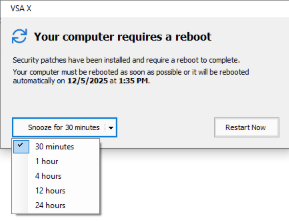
- The prompt targets reboots required by patches installed via the Patch Management policy, not for OS or user-initiated Windows updates, with some known exceptions:
- Reboot prompt appears without policy-driven patching: The system may display a reboot prompt even when no patches requiring a reboot were installed by a policy execution if the underlying Windows registry flags indicate a pending reboot due to other causes (for example: OS auto-updates, driver installations, or previous system events).
- Driver update and registry flag issues: Certain driver updates may require a reboot but do not set the expected registry flags, resulting in no prompt. Conversely, some system or agent crashes can set reboot-pending flags, causing a prompt even when no relevant patch was installed.
- Impact of automatic Windows Updates: If Windows Update installs patches outside of a Patch Management policy execution, the next policy execution may trigger a reboot prompt based on the system’s reboot-pending state, even if the policy itself did not install any reboot-required patches.
VSA mobile application improvements
Multi-instance support for the VSA iOS mobile app
You can now configure and access multiple VSA 10 instances from a single iOS mobile app installation. Seamlessly switch between environments without needing to reconfigure the app or use separate devices. This update streamlines your workflow, making it easier and more efficient to manage multiple systems on the go.
Key improvements:
- Users can add, configure, and switch between multiple instances via the Manage Instances button within the app.
- All configurations update automatically when switching instances.
- Supported on iPhone and iPad devices running iOS 18.5 and above.
Mobile application filter enhancements
Technicians can now create, edit, and save custom filter views directly from the mobile application. This enhancement gives you greater flexibility to personalize your device and alert management experience on both iOS and Android, making it easier to focus on what matters most to your business.
NOTE This release does not support iCloud sync of custom filters on iOS devices. If a user creates a custom filter on one device, it will not sync to another device using the same Apple ID, even after performing an iCloud sync or re-login.
Advanced Reporting: Site maps and discovered devices
This release introduces the new Site Maps and Site Map Discovered Devices datasets, a corresponding report template, and the ability to add discovered device data to your custom Advanced Reporting reports. This makes it easier to review and export site map information for your managed environments. Reporting is available for one site map at a time, ensuring focused and actionable insights.
Key features:
- A new Discovered Devices report template has been added to Advanced Reporting.
- Site Maps and Discovered Devices data can now be included in custom Advanced Reporting reports.
- Reporting is limited to displaying information for one site map at a time.
Automation updates
Workflow execution cancel API and canceled status
You can now programmatically cancel running or pending workflow executions using a new API endpoint, giving you greater control and flexibility in automation management. The system introduces a new Canceled status for workflow executions, making it easier to monitor and manage automation activities from external tools. These enhancements ensure that permissions are respected and provide clear feedback on cancellation requests.
Enhanced device-level workflow management
Technicians can now monitor and manage workflow executions at the device level directly from the device card. This update introduces a new Workflow Activity view giving you detailed visibility into workflow activity for both online and offline agents. You can view execution details, filter by status, and cancel workflow executions based on your permissions, all from a single streamlined interface. For a complete list of workflow activity across devices, you can easily navigate to the main Workflow Activity page. Refer to Viewing workflow activity.
API enhancements for automated organization onboarding
You can now automate key steps of the organization onboarding process using new and enhanced API endpoints. These changes allow you to set organization types, configure PSA mappings with Autotask during organization creation, and delete organizations, sites, or agent groups via the API. Together, these enhancements significantly reduce the manual effort required to onboard and manage organizations at scale.
Organization type on Create/Update
- The Create and Update organization endpoints now accept an optional OrganizationType parameter. Invalid values return 400 BadRequest.
- The OrganizationType field is also returned in the Get All Organizations and Get Specific Organization responses.
PSA mapping configuration at organization creation
- The Create organization endpoint now accepts an optional psaMapping node to configure Autotask company mapping during organization creation.
- Supported mapping types: MapToNewCompany (creates a new company in the PSA system) and MapToExistingCompany (maps to an existing company by ID).
- If no PSA integration is enabled for the tenant, the request fails with 400 BadRequest.
- The Get All Organizations and Get Specific Organization endpoints now return PSA mapping details.
Delete endpoints for organizations, sites, and agent groups
- New DELETE endpoints for organizations, sites, and agent groups allow removal of entities by ID.
- Only empty entities can be deleted (for example: An organization with no sites, a site with no groups, or a group with no systems). Attempting to delete a non-empty entity returns 400 BadRequest.
- New API token permissions (Delete Organization, Delete Site, Delete Group) are available and are not assigned to any existing tokens by default.
- All delete operations are audited.
API documentation has been updated to reflect all changes.
MDM: Extensive asset information
This release enhances the iOS device information by introducing additional hardware properties, certificate details, security-related attributes, and comprehensive asset information within the device card.
Key features:
- The following information is now available in the Asset Info tab of the device card for MDM devices:
- MDM · Network
- MDM · SIM
- MDM · Security
- MDM · Accounts
- MDM · Shared iPad
- MDM · Hardware
- MDM · Accessibility
- Information updates every hour.
Ransomware Detection: Updated RWDWrapper
You can now take advantage of enhanced ransomware detection with the update to RWDWrapper version 1.5.2.3. This release improves support for new ransomware types and ensures compatibility with the latest .NET 8 environments, helping you stay protected against evolving threats with seamless integration into your existing setup.
3rd-Party Patching: April updates
There are no notable updates to the software catalog in this release.
Refer to VSA 10 software application catalog.
Updates since this release
Below are release notes for any minor releases that occurred during this release cycle before the next full release. Releases are organized in order with the highest release number at the top.
VSA 10 version 10.26.1
Platform
- Security update
Fixes
Audit
-
Audit Logs now correctly record script names executed via the Scripts device card, not just bulk actions.
API
- Resolved an issue where the API call for retrieving agent groups returned both active and deleted groups instead of only existing ones.
- The API now returns consistent local date/time and last boot up time values, matching the web application UI.
Automation
- Fixed an issue where script input variables were not available under the Run Script workflow action after conditions were applied.
- The Get URL, Write File, and Unzip File workflow actions on macOS now use a consistent working directory and path handling for both absolute and relative paths, preventing files from being saved or extracted to unexpected locations.
- When scheduling workflows for another time zone, the UI now displays the start time correctly using the specified time zone.
- Bitdefender agent installation workflows now successfully download the eps.rmm installer instead of failing with an invalid URL error.
- The Get Device Value workflow action now reads registry keys with read-only permissions, resolving access errors.
- The Create PSA Ticket workflow action now loads all organizations in the Account drop-down menu, not just the first 100.
ConnectWise Integration
- Fixed an issue where ConnectWise would fail to create and map new device records when using the Create New Device and Map functionality in the integration, and improved error logging for device mapping issues.
Mobile App
- Fixed an issue where the mobile app would log out users within 14 days despite active usage.
- Cloud device type tasks now display correctly in the Android mobile app, matching iOS behavior.
Patch Management
- Monthly Patch Management policy schedules now retain the selected start date correctly in the UI across all time zones.
Platform Performance
- Reduced high CPU usage on app servers by optimizing an API endpoint.
Notifications
- Probe Offline alerts no longer repeatedly retrigger offline notifications for dependent network devices.
- Fixed an issue where monitoring policies were triggering excessive Service Stopped alerts for unmonitored services.
Remote Control
- Remote Control smart sizing now correctly scales the remote desktop to fit the client application window.
- Resolved an issue where users belonging to multiple user-defined teams were sometimes unable to remote control machines which their currently selected team has access rights to.
Reporting
- Fixed an issue where advanced asset reports (such as the Assets List report under Advanced Reporting > Audit > Hardware) failed with an error when run for sites without any machines assigned; they now complete successfully and display a No machines found message instead of failing.
- The Missing Patch advanced report now accurately reflects the number of fully patched devices, matching the dashboard.
- The Last Seen timestamp now appears correctly in the Missing Patches (OS) advanced report.
- The Installed Date now displays in the Installed Patches advanced report.
- The Missing Patches (OS) advanced report now properly reports fully patched machines with a clear message.
- Task Execution Output reports now generate successfully from the web and mobile applications.
- Resolved an issue where reports were showing values from expired custom fields.
Web App
- Updated the password complexity requirements displayed on the Create User Account page.
- Resolved an issue where VMware Active Connectors were showing inaccurate CPU usage metrics for virtual machines.
- Multi-session Azure virtual machines running a workstation OS are now correctly categorized as workstations, not servers.
- Device status (online/offline) now displays consistently with timestamps across all platforms and OS types.
- Fixed an issue where active sessions were terminated after 120 minutes on SSO-enabled on-premise setups, even with ongoing activity.
- Resolved an issue where the Quick Scan option was not available for agents using Bitdefender and Webroot in Endpoint Protection.


