VSA 10: Version 10.25 release notes
NOTE During release deployment, all active web application sessions will be disconnected, and customers will need to log in again at the beginning of the maintenance window. SaaS customers will be informed of their maintenance window via status.kaseya.com.
Schedule*
| Region | Date | Starting Time (EST) |
|---|---|---|
| APAC | Thursday, February 26, 2026 | 12:00 |
| EMEA | Thursday, February 26, 2026 | 15:00 |
| US | Thursday, March 5, 2026 | 21:00 |
| On-Premises | Wednesday, April 1, 2026 | 21:00 |
NOTE *The schedule is subject to change. Check the Status page for regular updates. Any changes made to the original schedule are denoted in red.
In this release, agents will be updated to version 10.25. Some features will only be available once the agent has been updated. For each tenant, agents are programmed to automatically, randomly update within a 36-hour window following the release deployment. A device's agent version can be viewed and can be manually updated by navigating to Device Details > Software > Agent Version.
The agent version for this release is 10.25.
The VSA 10 team is reaffirming its commitment to delivering important updates more frequently through officially recognized interim releases. These releases will typically include urgent bug fixes or minor enhancements and will not require scheduled maintenance windows. Details of the updates since the previous full release will be included in Updates since this release.
VSA FIPS certification updates
FIPS 140-3 compliant cryptographic communications (On-Premises customers)
IMPORTANT Support for FIPS 140-3 compliant cryptographic communications in on-premises environments, originally planned for this release, has been temporarily postponed. We’re continuing work to ensure it meets our security, reliability, and performance standards. Please see the VSA 10: Version 10.26 release notes for an updated timeline.
Key feature enhancements
Outbound Email: migration to modern M365 authentication flow (OAuth)
This release enhances the security of Microsoft Office 365 SMTP integration for outbound emails by replacing the legacy username/password authentication with OAuth authorization code flow. The update eliminates the need to store user credentials and aligns with Microsoft’s planned deprecation of basic authentication, ensuring continued email delivery and compliance.
IMPORTANT Migration to this new authentication method should be completed prior to Microsoft’s deprecation of basic authentication to ensure continued functionality of outbound emails from the VSA 10 platform. At the time of writing, deprecation is expected to start on December 31st, 2026. Check here for up to date details.
Key improvements:
-
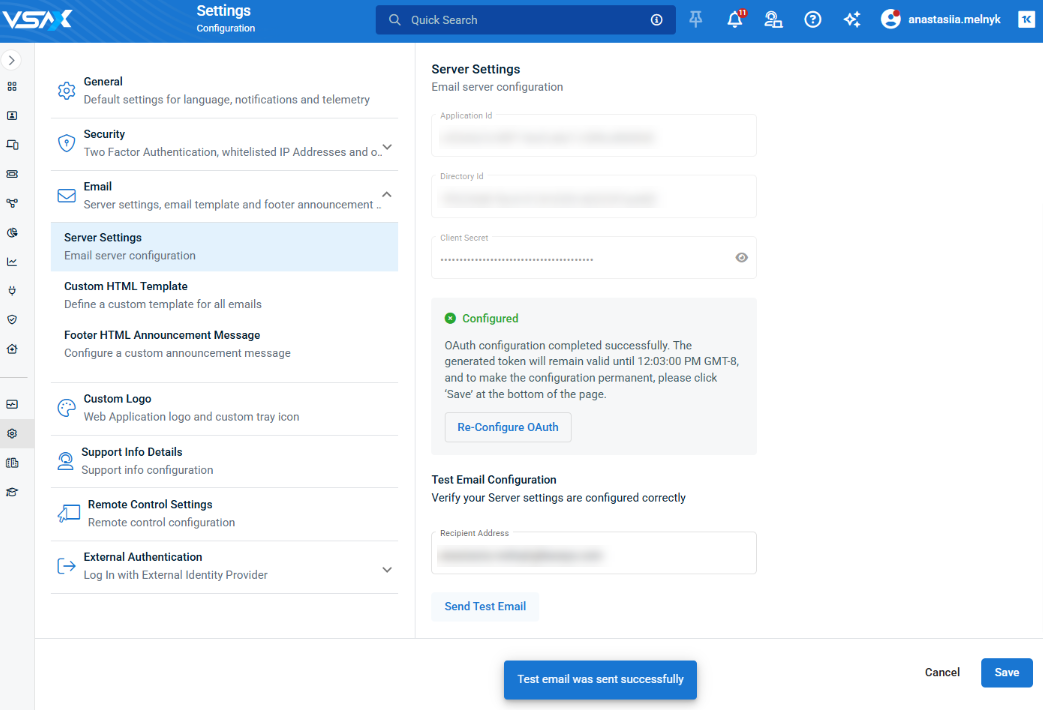
When configuring OAuth service settings for your outbound emails, a username and password are no longer needed. The new OAuth setup will require only the Application Id, Directory Id, and Client Secret:
-
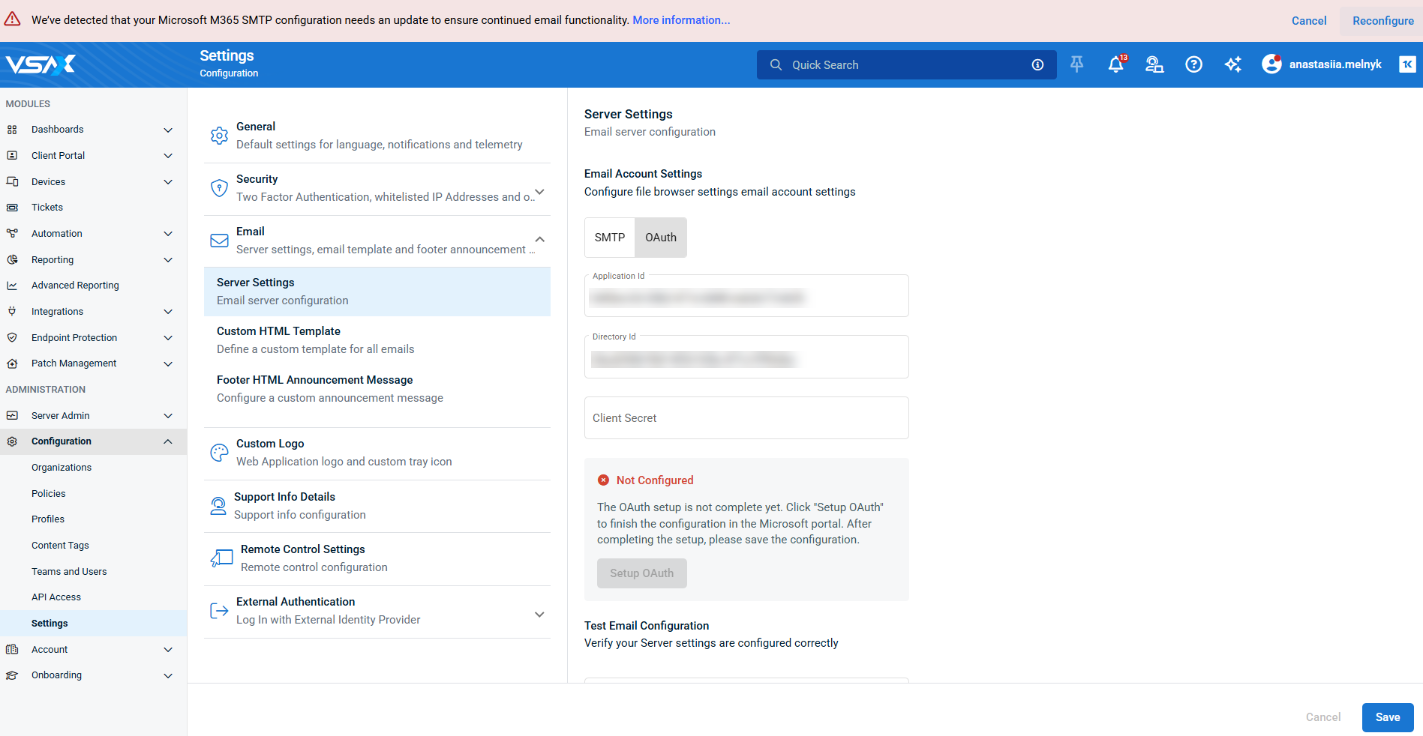
Existing configurations using the old method remain active until reconfigured; a persistent banner will prompt Admin users to migrate. The banner reappears on each login if dismissed without migration.
-
If there is an issue refreshing the SMTP OAuth access token, the banner will notify Admin users.
Monitoring: Hardware monitoring driver migration
This release deprecates and replaces a legacy hardware monitoring driver in the Windows Agent, improving the accuracy, security, and maintainability of hardware monitoring. The update ensures continuity of functionality during the transition period, with clear identification of deprecated parameters.
- A new hardware monitoring library has been integrated into the Windows Agent starting with version 10.25.
- When editing hardware notification settings from the VSA X Agent Manager, dropdowns display parameters from both the new and legacy library; legacy parameters are labeled as (Deprecated).
- For agents updated to 10.25 or later that do not have previously configured hardware notifications, deprecated parameters are no longer available for selection.
IMPORTANT The legacy driver will be removed from the product in the next release (10.26). To ensure continued operation of hardware monitors, deprecated parameters should be removed and replaced no later than March 26th, 2026.
Remote Control on Demand for macOS devices
You will now be able to utilize our Remote Control on Demand (RCoD) feature to provide secure, temporary remote support to users on “unmanaged” macOS devices, with no VSA agent or admin privileges required. We have also added support for technicians using macOS devices to initiate RCoD sessions with Windows or macOS end users. This enhancement ensures seamless support across both Windows and macOS platforms, expanding your ability to resolve issues quickly for all users. Refer to Remote Control on Demand.
RCoD now supports all the following scenarios (technician > end user):
- Windows > Windows
- Windows > macOS (new)
- macOS > Windows (new)
- macOS > macOS (new)
This update adds the following RCoD functionality for remotely connecting to macOS devices:
- Technicians using macOS can now generate RCoD sessions and share with end users.
- When clicking on a RCoD session link, end users will now have the option to select Windows or macOS when downloading the installer file.
- End users on macOS can download the RCoD installer and run it to grant remote access to their device, no admin access required.
Automation: Manage Automation Hub folder permissions from the Teams and Users page.
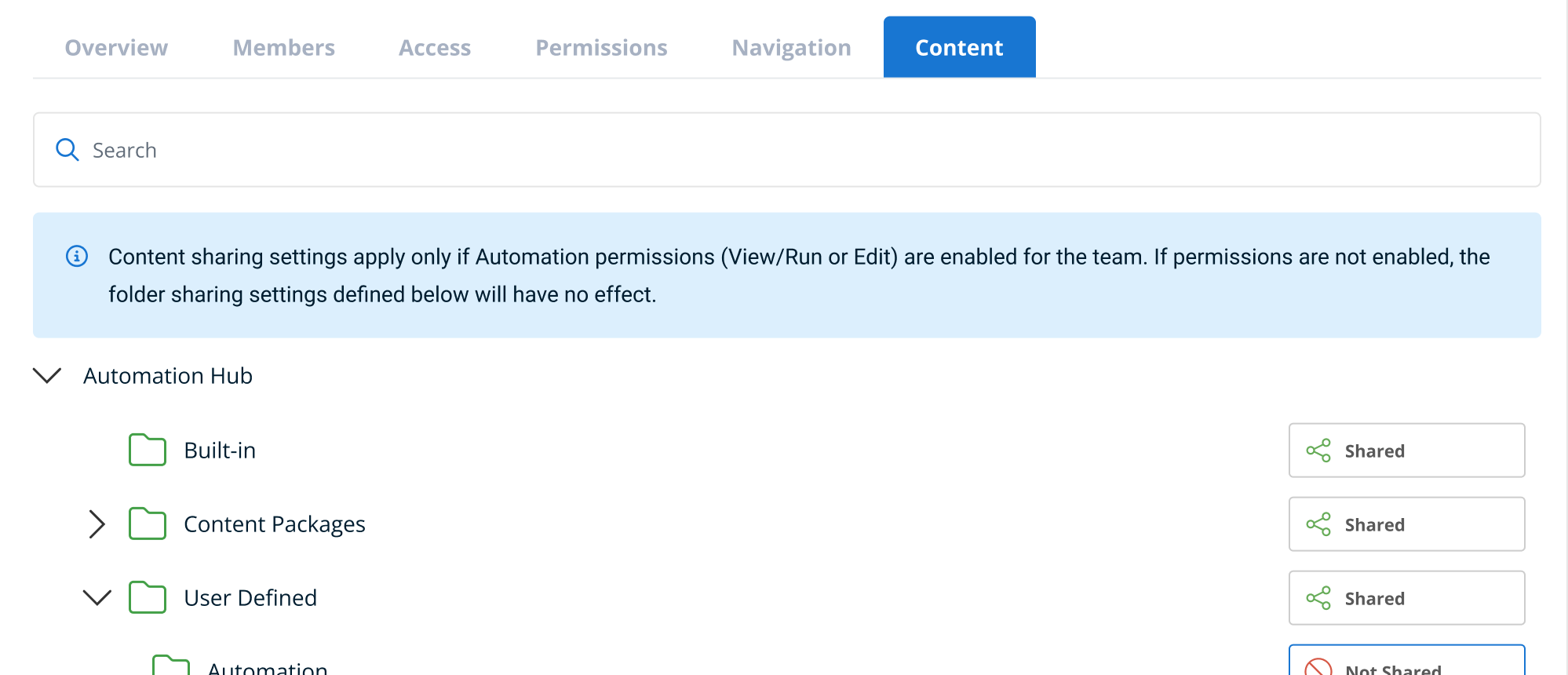
Administrators can now manage Automation Hub folder permissions, initially introduced in the 10.24 release, from the team context, making it easier to control access for your individual teams. A new tab in the team properties displays all Automation Hub folders in a tree view, allowing administrators to view and change the team’s permissions for each folder. Refer to Content.
Key improvements:
-
A new Content tab has been added for user-defined teams on the Teams and Users page:
- The Content tab is visible for all teams, regardless of Automation permissions; a message will display that outlines the permissions required for access to the Automation Hub.
- The Content tab will display all Automation Hub folders in a folder tree, showing effective permissions as Shared (Default), Not Shared (Default), Shared (Inherited), or Not Shared (Inherited) based on RBAC settings.
-
Administrators can explicitly set or change access for each folder directly from this tab, which will apply to all users belonging to the selected team.
-
Audit logging for these changes is not included in this release but is planned for a future update.
Automation: Cancel scheduled and ad-hoc workflows.
You can now cancel in-progress and pending ad-hoc or scheduled workflows directly from the web application. This enhancement gives administrators and technicians greater control over automation, allowing them to stop workflows before or during execution across one or more devices. All workflow cancellation events are logged for auditing, including details about the user, device, workflow name, and timestamp. Refer toCancel pending or in-progress workflows .
Key improvements:
- Workflow cancellation is available on the renamed Workflow Activity page (formerly Workflow History) for ad-hoc and scheduled workflows in “Running” or “Pending” status.
- Bulk cancellation is supported, with filters and device scope respected.
- Permissions:
- Admins and users with Automation > Edit can cancel any workflow.
- Users with Automation > Run can only cancel workflows they started.
- Canceled workflow executions are marked with a new Canceled status and message. An execution can be in a Canceling status for some period before transitioning to Canceled.
- Cancelling a workflow does not remove recurring schedules, only the currently running or pending instance will be canceled.
- Audit Log records each cancellation, including user, device, workflow name, and timestamp.
- Workflows triggered by notifications cannot be canceled.
- UI updates include new status icons, filter options, and a cancel warning dialog.
- API and device card cancellation are out of scope for this release.
MDM: iOS location tracking history and additional location details
This release improves iOS location tracking introduced in 10.24 by adding location history and a more focused way to investigate device location.
Key improvements:
- More location context: Location history and detailed timestamps help understand where a device has been, not just its last known position.
- Dedicated Location Tracking view: Clicking Last Known Location opens a single view with device status, key identifiers, location details (address, coordinates, last seen), and a map centered on the latest location.
- Clear time zone handling: Timestamps default to the user’s local time, with an option to view times in the device’s local time zone.
- Lost Mode location tracking: Devices can be tracked using a dedicated Lost Mode location tracking mode, designed specifically for lost or stolen device scenarios.
NOTE To enable location tracking, the Location Tracking profile will need to be applied to monitoring policies targeting iOS devices. Refer to Location Tracking profiles.
Advanced Reporting: Patch Status reports
You can now use Patch Status data in Advanced Reporting, making it easier to review and export patch deployment information for your managed environments.This release introduces a new Patch Summary dataset with a corresponding report template and enables you to add patch summary data to your custom Advanced Reporting reports. Reporting is available for one policy at a time, ensuring focused and actionable insights.
Key features:
- A new template Patch Summary report has been added to Advanced Reporting.
- Patch summary data can now be included in custom Advanced Reporting reports.
- Reporting is limited to displaying information for one policy at a time.
Device Status notification enhancements
This release aligns the repeatability logic of online device notifications with that of offline notifications, ensuring both types of alerts follow the same configuration in the Status Monitoring profile. The change eliminates inconsistent notification behavior and improves the reliability of device status alerts for technicians. Refer to Online status notifications.
Key improvements:
- Online notifications are now strictly dependent on the offline notification’s repeatability setting in the Status Monitoring profile.
- If offline notifications are set to non-repeatable, only one online notification will be sent after the device returns online, regardless of how often the device status changes.
- If offline notifications are repeatable, online notifications will also repeat, but only after a new offline notification is sent and the device transitions back online.
- Online notifications will not be sent if no offline notification was previously triggered, or if offline notifications are disabled.
- If an offline notification record is deleted, the next offline and online events will resume normal notification behavior.
3rd-Party Patching: January-February Updates
New titles:
- Mozilla Thunderbird ESR x64
- Mozilla Thunderbird ESR x86
Refer to VSA 10 software application catalog.
Updates since this release
Below are release notes for any minor releases that occurred during this release cycle before the next full release. Releases are organized in order with the highest release number at the top.
VSA 10 Version 10.25.2
Patch Status: Reinstatement of the Failed column
-
This release reinstates the Failed column to the Patch Status view following temporary removal in 10.25.1.
VSA 10 version 10.25.1
Patch Status: Temporary removal of Failed column
-
To address a performance issue in the Patch Status view, the Failed column has been temporarily removed. This change improves overall responsiveness and stability when loading patch data. Patches that have failed deployment will continue to be visible in the Deployment Pending view until they are successfully deployed. The Failed column will be reinstated in a future patch release once performance optimizations are complete. We appreciate your understanding as we work to enhance the Patch Management experience.
Fixes
Automation
- Fixed an issue where the Get Device Value step using the userHasConfirmed variable in ad-hoc workflows did not respect the configured timeout window. Previously, the prompt could time out earlier than expected, causing user responses to be ignored. With this fix, your workflows will now honor the full timeout period you set, ensuring users have the intended amount of time to respond.
Mobile App
- Fixed an issue where system uptime was not displayed for online devices in the mobile application.
VSA 9 Migration Wizard
- You can now successfully migrate agent procedures that utilize custom fields from VSA 9 to VSA 10 using the migration wizard. Previously, these procedures were marked as invalid and would not import, requiring you to recreate workflows from scratch. This fix streamlines your upgrade process and preserves your existing automation.
Web App
- Resolved an issue where some Windows devices were flagged as offline even though they were online and fully accessible.


