VSA 10: Version 10.29 release notes
NOTE During release deployment, all active web application sessions will be disconnected, and customers will need to log in again at the beginning of the maintenance window. SaaS customers will be informed of their maintenance window via status.kaseya.com.
Schedule*
| Region | Date | Starting time (ET) |
|---|---|---|
| APAC | Thursday, September 17, 2026 | 12:00 |
| EMEA | Thursday, September 17, 2026 | 15:00 |
| US | Wednesday, September 23, 2026 | 21:00 |
| On-Premises | Wednesday, September 30, 2026 | 21:00 |
NOTE *The schedule is subject to change. Check the Status page for regular updates. Any changes made to the original schedule are denoted in red.
In this release, agents will be updated to version 10.29. Some features will only be available once the agent has been updated. For each tenant, agents are programmed to automatically, randomly update within a 36-hour window following the release deployment. A device's agent version can be viewed and manually updated by navigating to Device Details > Software > Agent Version.
The agent version for this release is 10.29.
The VSA 10 team is reaffirming its commitment to delivering important updates more frequently through officially recognized interim releases. These releases will typically include urgent bug fixes or minor enhancements and will not require scheduled maintenance windows. Details of interim releases will be linked from this callout when available.
Key feature enhancements
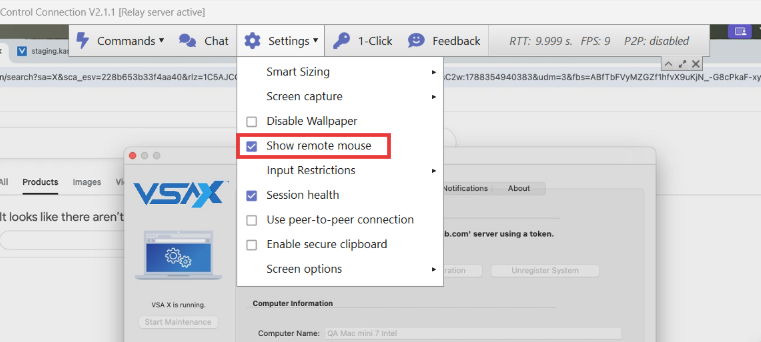
Show / hide remote mouse for Windows and Mac
Technicians can now optionally view the remote user's mouse cursor during shared remote desktop sessions, making collaborative troubleshooting easier and more intuitive. Refer to Remote session tools.
Key features:
- A new Allow technician to view remote mouse toggle has been added to Remote Desktop configuration profile settings, giving administrators control over this feature at the device level.
- If enabled in the target device's policy, a Show/Hide Remote Mouse control is available in the Settings section of the Remote Desktop client toolbar, allowing technicians to toggle cursor visibility on or off during a session.
- When enabled in policy and toggled on during a session, the remote user's cursor is displayed alongside the technician's cursor with accurate positioning across multi-monitor setups.
- Supported on Windows and macOS agents and remote desktop clients.
NOTE This feature is disabled by default at both the policy and session level.
Audit log page modernization
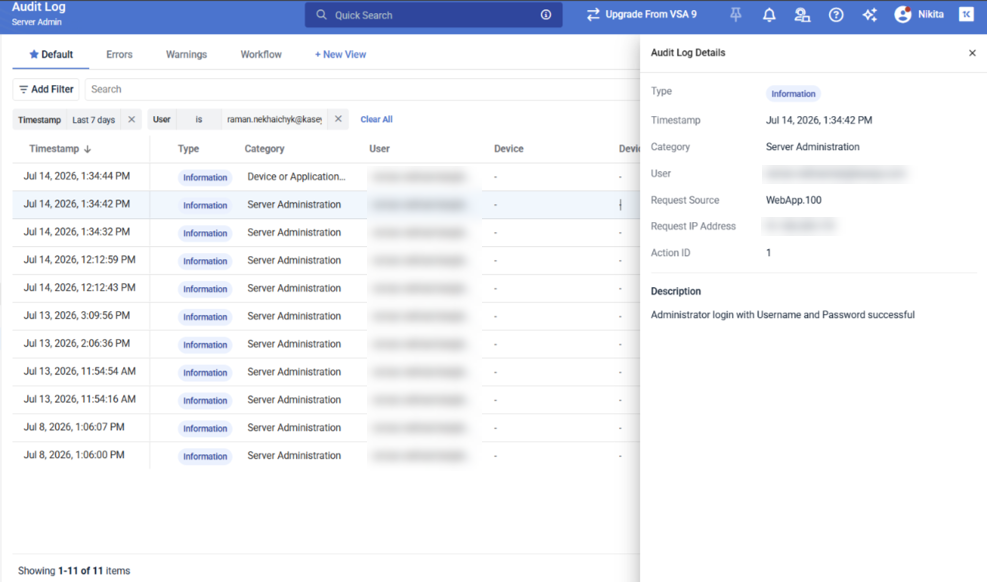
This release converts the Audit Log page to a modern, high-performance interface with customizable columns and improved search and filtering. Refer to Audit Log.
Key features:
- Modernized UI/UX replaces the legacy interface with the VSA 10 UI framework for a consistent look and feel
- Enhanced filtering and search lets administrators quickly locate audit events during compliance checks or investigations
- Dynamic column management lets administrators show, hide, and reorder columns to surface relevant information
- Standardized naming and formatting applies consistent labels, date formats, and data presentation across audit entries
- Server-side pagination shifts data processing to the back end to reduce load times for large datasets
Enhanced device card storage browser
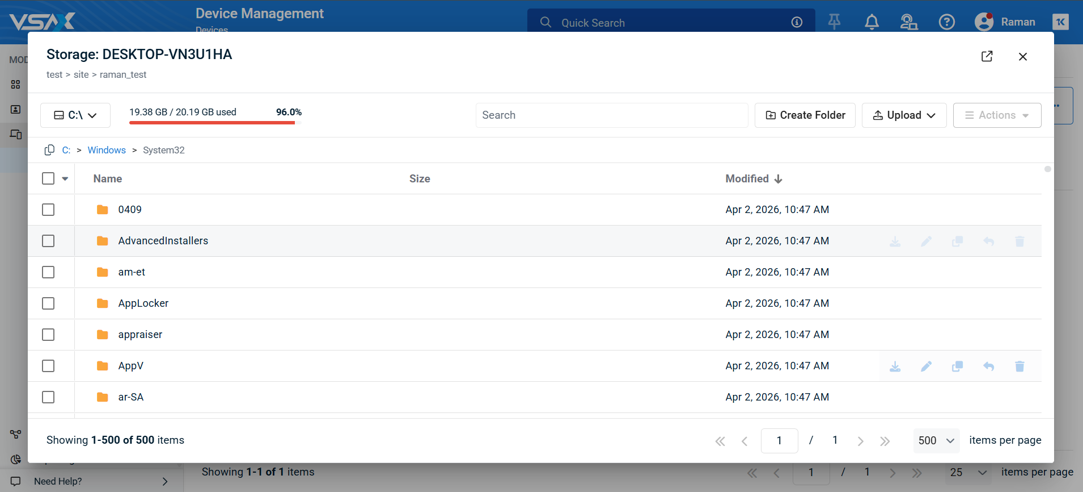
Re-imagined Storage Browser enables technicians to reliably work with large directories directly from the new Device Card, aligning the user experience with other background remote tools such as Registry Editor. Refer to Background file transfer.
Key features
- Support for directories with 10,000+ files, with optimized pagination and search/filter capabilities.
- Improved bulk actions such as file/folder copy.
- Pop-out Storage Device Card into a separate browser tab for concurrent working on multiple devices.
- Storage Browser can be favorited with a shortcut from the Device Management grid for quick access.
Fixes
- Fixed an issue where double-byte characters (for example, Korean, Japanese) were not rendered correctly in generated reports.
- Resolved an issue where the VSA 10 updater crashed on Amazon Linux AMI 2018.03 systems because the updater attempted to call systemctl, which is not supported on that platform. The updater now handles service management correctly on Amazon Linux, allowing updates to complete without error.
- Fixed an issue where updating the agent on Rocky Linux 9 devices caused the agent service to crash.
- Fixed an issue where On-Premise users were automatically logged out after 120 minutes even when actively using the application.
- Resolved an issue where the VSA 10 updater crashed repeatedly on Red Hat Enterprise Linux servers during update attempts, causing service instability and incorrect agent availability reporting. The updater now completes successfully on RHEL, restoring reliable agent updates on those systems.
- Resolved an issue where the VSA 10 Agent failed to start on fresh Arch Linux installations, timing out during startup or crashing with a SIGABRT signal. The agent now starts reliably on Arch Linux, including systems running recent kernels.
- Fixed an issue in Integrated Customer Billing where a failure during the nightly organization synchronization could cause existing VSA 10 organizations to be incorrectly reported as deleted, making them unavailable in the Autotask module organization mapping list. Organizations affected before this fix require a separate data restore.
- Fixed an issue where the Latest Alerts dashboard widget displayed no data after upgrading to version 10.28.
- Fixed an issue in Device Management where tag-based scopes failed to display matching endpoints.
- Fixed an issue where the VSA 10 Agent crashed and went offline after a few hours of normal operation on Rocky Linux 9.8. The agent now remains stable over extended operation on that platform.
- Fixed an issue where connected endpoints frequently flickered between online and offline statuses in the WebApp.
- Fixed an issue where the Linux agent service crashed shortly after startup on fresh Ubuntu 26.04 installations.
- Fixed an issue on the endpoint Remote Control page where missing scroll bars prevented users from viewing all active terminal sessions.
- Fixed an issue in workflows where the Add System Tags workflow action displayed only 20 system tags in the drop-down, requiring users with larger tag libraries to search manually for tags beyond the initial list. The drop-down now loads all available system tags.
- Fixed an issue where the iOS app restart command did not execute on end systems in On-Premise instances, even though the same command succeeded from the Android app and web application. Restart commands from the iOS app now execute reliably on On-Premise endpoints.
- Fixed an issue where the Merge Policies dialog on the Organization page did not display its action buttons, making it impossible to complete a policy merge from that page. The merge dialog now renders correctly with all expected controls.


