VSA 10: Version 10.28 release notes
NOTE During release deployment, all active web application sessions will be disconnected, and customers will need to log in again at the beginning of the maintenance window. SaaS customers will be informed of their maintenance window via status.kaseya.com.
Schedule*
| Region | Date | Starting Time (EST) |
|---|---|---|
| APAC | Thursday, July 23, 2026 | 12:00 |
| EMEA | Thursday, July 23, 2026 | 15:00 |
| US | Wednesday, July 29, 2026 | 21:00 |
| On-Premises | Wednesday, August 5, 2026 | 21:00 |
NOTE *The schedule is subject to change. Check the Status page for regular updates. Any changes made to the original schedule are denoted in red.
In this release, agents will be updated to version 10.28. Some features will only be available once the agent has been updated. For each tenant, agents are programmed to automatically, randomly update within a 36-hour window following the release deployment. A device's agent version can be viewed and manually updated by navigating to Device Details > Software > Agent Version.
The agent version for this release is 10.28.
The VSA 10 team is reaffirming its commitment to delivering important updates more frequently through officially recognized interim releases. These releases will typically include urgent bug fixes or minor enhancements and will not require scheduled maintenance windows. Details of interim releases will be linked from this callout when available.
Key feature enhancements
Policy targeting by Device Tag
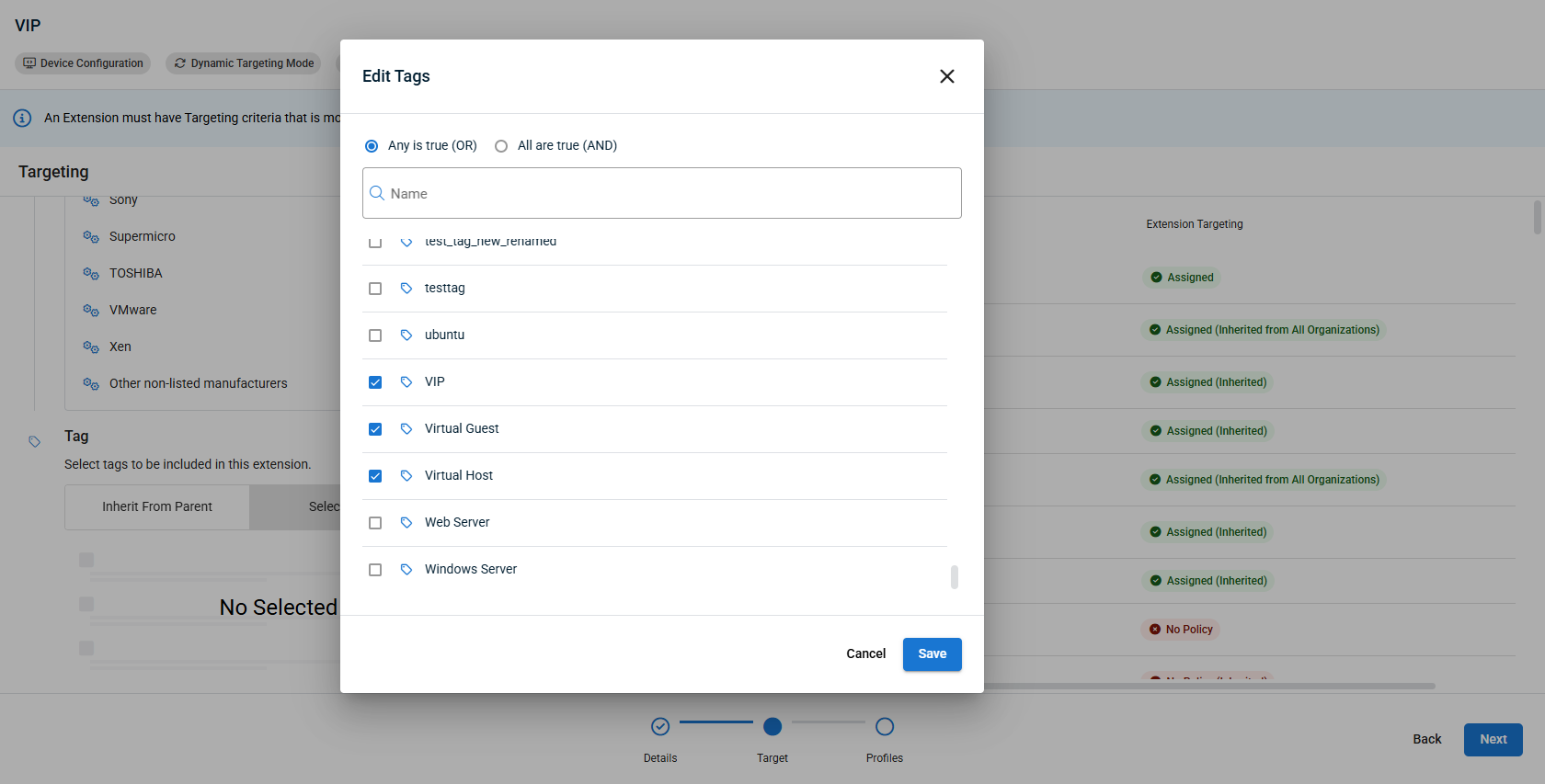
Technicians can now automatically target the right devices with the right policies based on dynamic Tags, with clear visibility into where each policy applies and which settings take effect.
Because tag assignments can change frequently, this approach ensures that policy coverage automatically reflects a device's current state without requiring manual updates. Technicians also gain clear visibility into which devices a tag-based policy covers, and what effective settings result from overlapping policies.
Key features
- Tag‑based policy targeting: Policy scope can be defined using multi‑select tag inclusion, so policies are dynamically applied and removed as device Tag assignments change.
- Conflict‑safe tag reuse rules: Prevents a tag from being reused across conflicting active policies of the same type and deterministic criteria, with clear UI validation and error messaging.
- Inclusion and exclusion logic for tags: Exclusion tags that conflict with an existing inclusion tag takes precedence, so devices with overlapping tags can be explicitly excluded from a policy and surfaced in that policy's exclusion list.
- "One active policy per type per device" enforcement: Validation logic blocks activation of conflicting Policies and offers options to deactivate the existing one when a clash is detected.
- Effective settings visibility: At each Organization, Site, Group, and Device, the UI clearly shows which Policies are applied and the resulting Effective Settings for that entity.
For more information, refer to Dynamic Targeting.
Android MDM Updates:
Location tracking
Technicians can now track the real-time location of managed Android devices in VSA 10. This can be enabled via a Location Tracking monitoring profile, where administrators enable location tracking and set the reporting interval. When location tracking is enabled, Android devices display a Last Known Location entry that opens a map view showing the device's latest position, timestamp, and device details. Refer to Location Tracking profiles.
NOTE To use location tracking, the Kaseya Go app must be installed on the device and location permissions must be allowed. Refer to VSA 10 MDM: enrollment
Online status visibility
The MDM module now reports the real-time online and offline status of managed Android devices. Technicians can see at a glance which Android devices are currently reachable, making it easier to prioritize remote actions and identify connectivity issues across the managed fleet.
NOTE To track online status, the Kaseya Go app must be installed on the device. Refer to VSA 10 MDM: enrollment
Software update management via Declarative Device Management (DDM)
Technicians can now manage software updates for Apple devices using Declarative Device Management (DDM), replacing the deprecated SoftwareUpdate MDM payload. Two new configuration sections — Software Update Settings (DDM) and Software Update Enforcement (DDM) — are available in the Apple MDM System Configuration profile and can be applied to supervised and unsupervised iPhone, iPad, Mac, and Apple TV devices. Refer to Apple MDM System Configuration profile.
Private RDP: automatic screen resolution
Private RDP sessions now launch at the appropriate screen resolution automatically, rather than defaulting to a fixed small size. Technicians no longer need to adjust the display manually after connecting, resulting in a more usable remote session from the start.
Fixes
- Resolved an issue where whitelisted IP addresses were not respected, causing unexpected login failures from trusted locations.
- Resolved an issue where the MDM configuration profiles installed on iOS devices via the InstallProfile command were displaying a "Not Signed" status in iOS Settings despite being correctly signed by the service. Profiles now display their accurate signature status after installation.
- Resolved an issue where the VSA 10 Agent failed to start on fresh Arch Linux installations, timing out during startup or crashing with a SIGABRT signal. The agent now starts reliably on Arch Linux, including systems running recent kernels.
- Resolved an issue where the VSA 10 updater crashed repeatedly on Red Hat Enterprise Linux servers during update attempts, causing service instability and incorrect agent availability reporting. The updater now completes successfully on RHEL, restoring reliable agent updates on those systems.
- Resolved an issue where the VSA 10 updater crashed on Amazon Linux AMI 2018.03 systems because the updater attempted to call systemctl, which is not supported on that platform. The updater now handles service management correctly on Amazon Linux, allowing updates to complete without error.
- Resolved an issue where native 1-Click credential autofill was failing to paste passwords when IT Glue was the credential source, preventing technicians from using 1-Click access on affected machines. Password retrieval and autofill now work as expected with IT Glue credentials.
- Resolved an issue where inefficient online/offline string construction and timestamp handling were generating unnecessary system load. These operations have been optimized, reducing resource consumption during agent availability checks.
- Resolved an issue where, when an APNs connector was renewed or updated, devices that had been moved to a different enrollment group reverted to the organization's default enrollment group. Devices now retain their assigned enrollment group after an APNs connector update.
- Resolved an issue where notification details in Devices > Notifications disappeared automatically after 1–10 seconds when the list was sorted by Date, requiring technicians to repeatedly reopen notifications to read them. Notification details now remain visible regardless of the selected sort order.
- Fixed slow loading of the Services section on the Device Card by optimizing redundant service calls.


