VSA 10: Version 10.27 release notes
NOTE During release deployment, all active web application sessions will be disconnected, and customers will need to log in again at the beginning of the maintenance window. SaaS customers will be informed of their maintenance window via status.kaseya.com.
Schedule*
| Region | Date | Starting Time (EST) |
|---|---|---|
| APAC | Wednesday, June 3, 2026 | 12:00 |
| EMEA | Wednesday, June 3, 2026 | 15:00 |
| US | Thursday, June 18, 2026 | 21:00 |
| On-Premises | Wednesday, June 24, 2026 | 21:00 |
NOTE *The schedule is subject to change. Check the Status page for regular updates. Any changes made to the original schedule are denoted in red.
In this release, agents will be updated to version 10.27. Some features will only be available once the agent has been updated. For each tenant, agents are programmed to automatically, randomly update within a 36-hour window following the release deployment. A device's agent version can be viewed and manually updated by navigating to Device Details > Software > Agent Version.
The agent version for this release is 10.27.
The VSA 10 team is reaffirming its commitment to delivering important updates more frequently through officially recognized interim releases. These releases will typically include urgent bug fixes or minor enhancements and will not require scheduled maintenance windows. Details of the updates since the previous full release will be included in Updates since this release.
Key feature enhancements
MDM: Android device management
VSA 10 introduces Android device management, delivering a unified and streamlined approach to enrolling, configuring, and controlling Android devices across your organization. The feature supports a broad range of Android OS versions and integrates with Android Enterprise to ensure compatibility with modern enterprise mobility standards.
Key features
Device enrollment
Enroll individual Android devices quickly and securely using QR code-based enrollment via an Android Enterprise connector, minimizing manual setup and reducing onboarding time. Refer to Android MDM Enrollment.
Supported enrollment types:
- Personally-owned devices (BYOD)
- Company owned: Personal usage allowed
- Company owned: Fully Managed
- Company owned: Kiosk mode
Device configuration via policies and profiles
Define reusable configuration templates and associate them with management policies to automate device setup at scale. Refer to Android MDM profiles.
Configuration options:
- User account provisioning
- Network settings (Wi-Fi, VPN, APN)
- Security policies (password requirements, encryption)
- Hardware restrictions (camera, USB, Bluetooth)
- Google Play application configuration and management
Remote device commands
Execute remote actions on managed devices directly from the console. Refer to VSA 10 MDM commands.
Cooper Coach and Cooper Copilot rebranded as Kaseya Assist
Previously named Cooper Coach and Cooper Copilot for workflows, with this release Kaseya is renaming these tools under the Kaseya Assist banner. Documentation will be updated to reflect these changes. Refer to Kaseya Assist and Create workflows with Kaseya Assist.
Available Memory column improvements and renaming
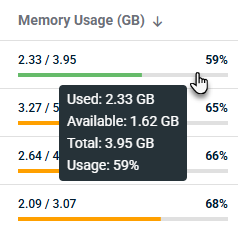
You can now track device memory consumption more clearly using the enhanced Memory Usage (GB) column, which replaces the existing Available Memory column in Device Management. This view shows used versus total memory in gigabytes, along with a visual progress bar and a percentage so you can quickly spot devices with high memory utilization.
Key features
- The Memory Usage (GB) column displays used and total memory in GB with two decimal places, and an integer usage percentage rounded to the nearest whole number.
- The progress bar color reflects usage thresholds: green (0–60%), orange (61–85%), red (86–100%).
- The column supports sorting by percent of memory used.
- Hovering over the progress bar shows a tooltip with Used (X GB), Available (Y GB), Total (Z GB), and Usage (Q%).
Nginx update notifications
When a new nginx version is available for your on-prem VSA 10 server, you now see an in-product banner (admin users only) so you can plan and run the update on your schedule. This helps you stay current on security fixes while maintaining control over maintenance windows.

Key features
- An in-product banner displays for administrators only when the system detects an outdated nginx version.
- Banner behavior is driven by the nginx version state (outdated vs. current), and is expected to appear when nginx is installed and out of date regardless of whether FIPS is enabled. The banner contains links to download the latest nginx update and access related documentation.
- Users can cancel the banner for their current login session, and it will be displayed again on next login if nginx is still out of date.
- If the latest nginx version is installed, the banner is removed.
- Updating nginx is expected to interrupt agent connectivity, and admins should plan the update accordingly.
Automation: Security notice about variable usage
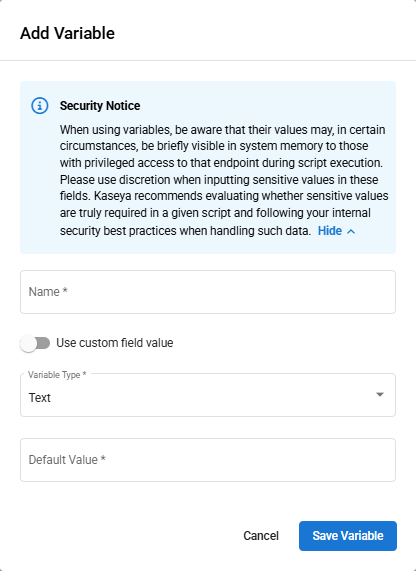
When you work with variables in Automation Scripts and Workflows, you now see a security notice in the UI. This helps you make informed decisions when using sensitive data within variables.
3rd-Party Patching: May updates
There are no notable updates to the software catalog in this release.
Refer to VSA 10 software application catalog.
Updates since this release
Below are release notes for any minor releases that occurred during this release cycle before the next full release. Releases are organized in order with the highest release number at the top.
NOTE No interim release information yet. Check back here for updates.
Fixes
API
- Added a completePSAticket parameter (default: false) when deleting a notification via API. Setting this parameter to true allows the associated PSA integration ticket to be automatically closed when a notification is deleted.
Automation
- Fixed an issue where the Send Message action in Workflows did not display messages on macOS devices.
Device Management
- Fixed an issue where the Device Management page displayed an error and became unresponsive after updating a device's Display Name.
- Restored the ability to pin the Remote Control as a favorite in device details.
- Fixed the Last seen online filter to correctly display only devices offline for the specified number of days, and updated the filter chip text to "Last seen online over X day(s) ago" for clarity.
- Fixed the Last Seen timestamp displaying incorrectly when the language is set to German.
-
Fixed an issue where Microsoft RDP sessions failed to launch through VSA 10 on environments with hardened TLS/Schannel security settings.
Reporting
- Fixed the Installed Patches (OS) report in Advanced Reporting to display the complete list of patches installed by VSA 10.
- Fixed an issue where the Executive Summary report displayed invalid memory consumption values for Linux devices.
VSA X Agent
- Fixed an issue where the Windows agent intermittently appeared offline due to slow WMI disk queries blocking agent check-ins, causing false System Offline notifications.
- Fixed an issue where a patch scan failed to detect available OS updates on devices configured to use WSUS (Windows Server Update Services).
Web App
- Fixed an issue where the Export Filter option in Event Log profiles failed to download the configured filter file.
- Fixed an issue where Ransomware Detection license consumption displayed one extra license compared to the actual number of endpoints.
- Fixed an issue where Endpoint Protection license consumption displayed an incorrect count higher than the actual number of devices with Antivirus installed.
- Fixed an issue where the All Users page under Configuration > Teams and Users reset column sorting to default after performing any action such as opening and closing the Create User Account dialog.
- Fixed an issue with excessive database transactions causing intermittent web application unavailability.


